Human checkpoints, SOP-managed context, and sandboxed execution for production-grade agent systems.
Model capability has crossed the "usable" threshold, but teams pushing agents into production keep hitting the same three walls.
Without human checkpoints, AI-generated errors can reach end users directly. One incident destroys trust.
Finance, healthcare, and government need approval records and traceable audit trails. Pure automation fails the audit.
Prompts grow endlessly, tool lists keep expanding, handoffs rely on hidden state — maintenance cost far exceeds expectations.
Moving beyond one-shot prompts into fully orchestrated, controllable agent architectures.
Each generation unlocks new value — and new complexity.
Single-turn completions. No memory, no tools, no state.
Chained nodes with data transformation, RAG, and conditional branching.
Pause on human input. Reuse skills and SOPs. Pass explicit deliverables forward. Execute safely inside a sandbox.
The features that define Dify's production-grade agent direction.
Put human judgment inside the workflow graph, not beside it.
Oversight should not be a patch — it should be a native gate placed exactly where the workflow needs it.
Work changes mid-run. A pause point keeps workflows from becoming rigid.
High-stakes teams need visible checkpoints before AI can act for the business.
External approval queues and webhooks turn oversight into extra engineering, not native capability.
Pause before a workflow sends an email, publishes content, submits a ticket, or contacts a customer.
Use HITL on anomalies and edge cases instead of reviewing every run.
Ask for one missing field, then continue automatically with the updated value.
Finance, compliance, and customer-facing flows often need a visible approval checkpoint.
Execution pauses, a human sees the right context, and the workflow resumes on one of three simple outcomes.
Generate a review page and route it to the right person.
Insert editable fields and return new values safely.
Buttons, branches, and timeout rules to ensure resumption.
HITL adds expert judgment exactly where automated output becomes client-facing.
Report generation was automated, but compliance still needed a final look before financial updates reached clients.
Reviewers saw exactly what clients would receive, edited if needed, and approved with one click. By June, all 100 clients received consistent reports.
HITL is not only for approval. It is also a clean way to request missing context.
Employees moved across separate HR, finance, and IT portals. Requests often arrived without the details needed to route them correctly.
When Jason from R&D asked about reimbursement, the workflow noticed missing location data, requested it through Human Input, then returned the right Shanghai-office policy.
The agent becomes smaller: choose the right SOP, call the right skill, and leave usable artifacts behind.
Four failure modes in today's agent workflows — and the better operating model.
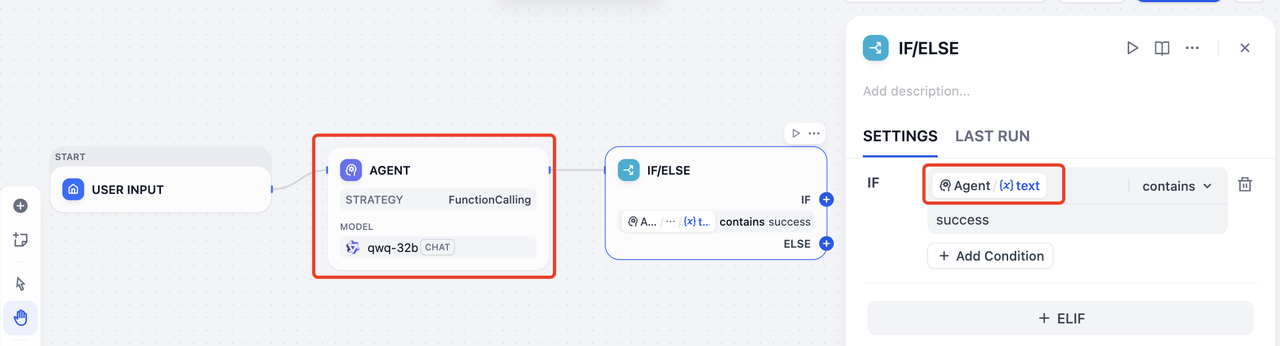
If the useful artifact stays inside the agent's memory, downstream nodes can only guess from prose.
Example: an IF/ELSE node tries to infer state from plain text.
Checking whether the agent happened to say success is brittle and hard to maintain.
Raw tables, reports, or generated artifacts can stay buried in memory while the next node only sees the summary.
The next agent cannot reliably see what the previous one actually delivered.
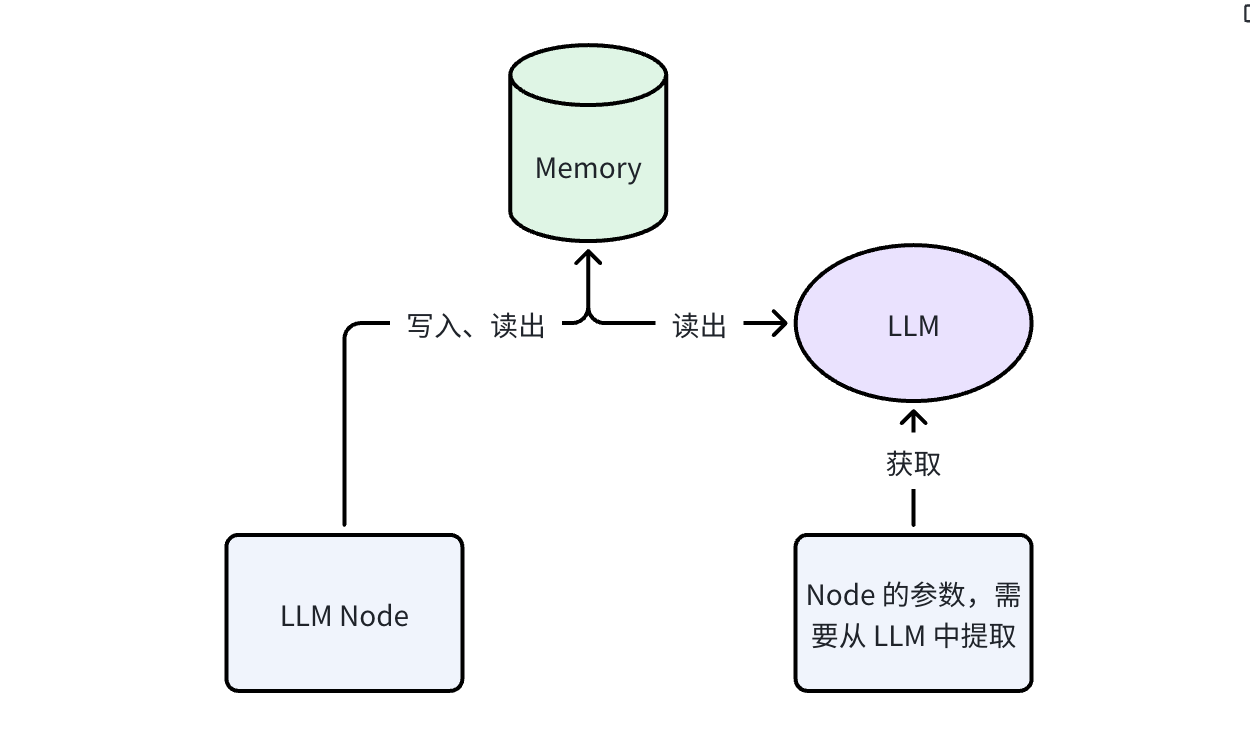
A production workflow needs more than a polished answer.
The human-facing explanation or final response.
Reports, tables, images, and other artifacts downstream steps can keep using.
Status, decisions, IDs, and parameters that branches or tools can read directly.
Reusable context that later nodes can extract facts, parameters, or files from.
A reusable execution unit that bundles SOP context, runtime behavior, and a reliable handoff contract.
The “how to do this well” playbook lives with the skill instead of being copied across nodes.
Publish once, then invoke it from different agents and workflows.
Run the skill with fixture inputs without triggering the full workflow.
Agents can pin a stable version instead of breaking whenever a shared skill changes.
Context engineering needs a shared home, not repeated prompt snippets.
/sops workspaceAn e-commerce ops team consolidated duplicated customer-service SOPs from 5 separate workflows into one shared Skill — cutting maintenance by 4x.
Each workflow contained a near-identical "customer-service script SOP" and "ticket classification logic." Updating one meant updating all five.
Each workflow only defines its own entrypoint and unique logic. Shared knowledge is maintained and versioned in one Skill.
Reasoning stays thin. Execution happens in a workspace built around files, commands, and reusable outputs.
Memory stops being an implementation detail and becomes a reusable workflow artifact.
The extraction LLM call is lightweight: it reads a bounded context window and outputs structured fields. Typical overhead is <1s and <500 tokens.
If extraction fails, the node falls back to the upstream agent's raw text output, so the workflow never silently breaks.
RAG retrieves from an external corpus; Memory Extraction pulls from the same run's working context. No vector DB needed — this is intra-workflow state, not cross-session retrieval.
Once agents work over SOPs, files, and explicit deliverables, the runtime has to feel useful and safe at the same time.
One command line in, stdout out, files left behind for the next step.
report --input ./turnsheet.csv --format json
Models already understand commands, pipes, and file paths from pretraining.
You do not need a custom UI for every tiny transformation or helper tool.
Bigger artifacts can stay as files and move forward explicitly instead of being squeezed into prompts.
Stop modeling every capability as a bespoke tool card. Let the runtime expose commands, files, and stdout.
step1: A = google_search(query="Dify", max_size=30)
step2: B = summary(query=A)
summary --query "$(google_search --query dify --max_size 30)"
Agents need a real execution surface — just not the host machine. A sandbox makes both possible at once.
Without isolation, code can read local credentials, environment variables, and files.
A bad loop or memory spike can block workers and hurt everyone sharing the runtime.
Imported packages can quietly exfiltrate workflow data unless the environment is controlled.
SANDBOX=true
A production system must not only run — it must be diagnosable when things go wrong and measurable day to day.
Every node's input, output, latency, and token usage is traced independently, so failures can be pinpointed to the exact step.
Token costs broken down by workflow, by node, and by model so teams know where money is going.
Is the bottleneck in inference, tool calls, or file I/O? Latency distribution charts make optimization evidence-based.
Failed runs can be replayed with full context — no guessing, no reproduction steps needed.
The workflow itself becomes a shared product surface for the team.
Different people can draft, review, or publish without stepping on each other.
Every publish creates a snapshot, so teams can compare and roll back quickly.
The lifecycle becomes visible and repeatable instead of living in screenshots and chat messages.
Best practices stop living as private prompt snippets and become team assets.
One person drafts the workflow, another reviews the SOPs, and a lead publishes the approved version with history still intact.
A production agent system where reasoning, runtime execution, and human review all share explicit deliverables.
Open-source ecosystem · GitHub Top 100 project
You do not need all three on day one — pick the pain point that hurts most and start today.
Drop a Human Input node into any workflow in the latest Dify release and add your first human checkpoint.
Extract your most-copied SOP into your first Skill and experience the efficiency of reuse and versioning.
Star the repo, join Discord, and help shape the future of agent systems with developers worldwide.
Questions, feedback, or want to explore a specific feature deeper?